Swim Meet 101
Heat Sheets
For those that are beginners to the sport of swimming, Heat Sheets are a bit overwhelming. With that in mind, we want to put you at ease. Reading a heat sheet is not as bad as you think. So... let’s dive in. (pun intended)
First of all, we need to address the question... What is a Heat Sheet?
A heat sheet is the program for a swim meet. It list all the events that are going to be swam. It list the swimmers in each race (or event). It tells us the heat and lane that the swimmer will need to be in for their race (or event).
Did we just throw out too many terms? Let’s define our terms to make it easier to understand.
When we talk about the pool area, we use the term deck. The pool deck is the area that surrounds the actual pool.
The pool itself is divided into lanes. Each lane is designated by a number. Typically lanes 1-6. The lanes are separated by lane lines (floaty ropes connected to each end of the pool).
Let’s talk about events. Events are listed by a #. The official will call for swimmers to line up for “Event # xx”, whatever the event number is. The official name of the event is spelled out beside the number of the event on the heat sheet. Ex. Event #xx boys 9-10 25 yard freestyle.
Next lets talk about heats. Depending on the number of swimmers in an event, an event might have multiple heats. A “heat” is the group of swimmers swimming in the pool at the same time. If there are more swimmers in an event than lanes to swim in, we need to create multiple heats (or groups) for that event. Ex. an event might have 10 swimmers total combined from each team. Only 6 can swim at one time due to only having 6 lanes. 2 heats would need to be swam with 6 in heat 1 and 4 in heat 2 to complete the full event.
OK, now that we have some terms down, let’s move on. Back to the heat sheet...
When you look at a heat sheet, you realize how much info is there. The good news is, the greater part of all that info is only 3 or 4 parts that we really need to know.
The Event #, heat # and the lane# to swim in.
Heat Sheet Sample
Below is a sample heat sheet. In the next section Example we will use event #13 to learn how to read the a heat sheet. Click here to download this sample heat sheet

Example

In the picture above, let’s use Laniyah as our example. (She is highlighted in yellow)
She is swimming in the Event Name “Girls 8 & Under 25 Yard Freestyle”
the “event” is #13.
The “heat” is #2
The “lane” is #6
The Event Name gives you the description of the event.
"Girls or Boys / Age Group / Distance to swim / Type of stroke being swam"
One length of the pool is measured as 25 yards (or sometimes 25 meters)
Grids for Swimmers
Now that you know how to read the heat sheet, let’s talk about how to keep your swimmer ready for their events.
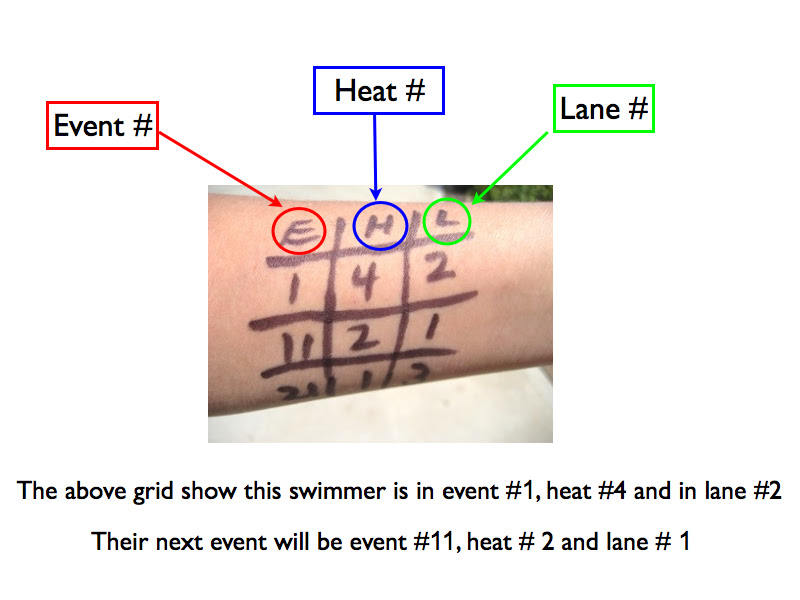
This is really easy. Simply draw a grid (like a tic-tac-toe board) on your swimmers arm.
(usually with a sharpie pen) With the 3 numbers that we talked about above, we write those #’s in the grid and ta-da!!!, your swimmer now knows exactly when and where they need to be for their events.
Swim Meet Volunteer Job Descriptions
Announcer/Starter. The host team will arrange for someone to act as announcer. In addition, they shall provide him with equipment to perform his duty. This equipment includes loudspeaker or bullhorn and an order of events. Announcing for each meet must be loud enough to be understood by participants, officials and spectators. This individual will also start each race.
Bullpen Parents. Bullpen Parents are essential to make sure the swim meet runs efficiently. Bullpen parents will call swimmers for each event/heat. They will be responsible for lining up the swimmers in the correct order and sending them to the pool deck. The Deck Manager will confirm the swimmers are in the correct lane for the event/heat when they are called to the starting blocks.
Check-In Desk These individuals will check-in all swimmers and volunteers prior to the meet. They will ensure all swimmers are marked for their events.They will communicate with the coach any swimmers who do not show up.
Computer Operator. The individuals in this position will input into the computer the results from each event/heat as reflected on the completed timer worksheet immediately after each event. A running score shall be kept at all times. Upon completion of the meet each team shall receive a copy of the final meet results.
Concessions. The individuals in this position will sell Concessions (drinks, snacks, fruit) during the meet to swimmers and families. They must be able to handle cash and make change. The Concession stand is set up in the Rock Wall area.
Deck Manager. This person is in charge of the ready area and shall line up all swimmers on the deck/starting blocks for their event. He/she shall notify each swimmer to wait behind the starting block until the starter takes over control of the race. Bullpen Parents line up the swimmers in the correct order of events/heats prior to the swimmers arriving on deck.
Event Board This position will be stationed on the pool deck with the event board to keep track of the event and heat that is happening in the pool.
Timers. For all events, times shall be taken on each lane. Each team shall provide a timer for each lane. Each of the timers will operate a watch and will record the times on the lane timer worksheet. In all events, at all times, the timers must have a clear view of the race and finish line. The timers shall look at the starter’s gun and start the watch at the instant of the starting device. The timers shall stop the watch immediately when any part of the swimmer’s body touches the pool edge. The timer shall record times on the timer’s worksheet and communicate these times to the Computer Operator.
Set-Up team. These individuals will set up the pool area, bullpen/staging area, and concessions area prior to the arrival of the swimmers and start of the meet. The arrival time is 2:00pm. Set up takes 30-45 minutes.
Clean-Up team. These individuals will clean up at the conclusion of the meet. Clean up takes 30-45 minutes.
Floater This position will fill in where needed or if there is a no-show for another position.